BabyTeller
Coming soon to the App Store

Logging a feed should take one tap.

Not five. Not "open the app, find the screen, pick the side, confirm." One. And when both your arms are full, none at all. Just say it out loud.

Why this exists

I built this for my wife.

Madelyn and I have a newborn daughter, Elyse. Like everyone else, we started with whichever apps came up first and worked through several of them.

Every one wanted the same thing. Open the app. Find the screen. Pick the side. Confirm. At two in the morning, one-handed, with a baby on the other arm and the lights off.

I am a software engineer and a girl dad, which mostly means I have strong opinions about how hard my wife's nights ought to be. So I built what we actually wanted, around one question: how many taps did that take?

It is the app we use every night. If it makes yours easier too, that is the whole point.

Jared Teller
Here is the answer, three times over. Every other tracker makes you open it first. BabyTeller starts where you already are.

1

From a widget

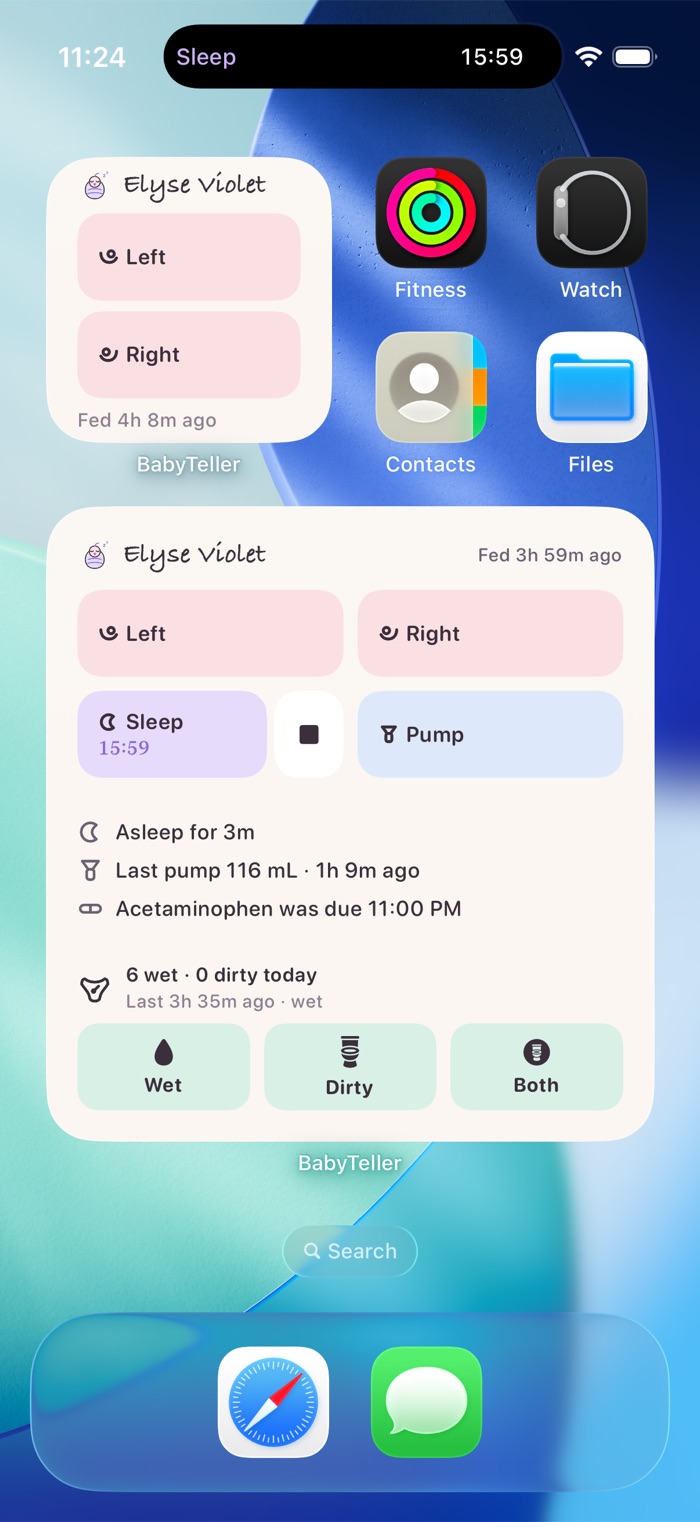
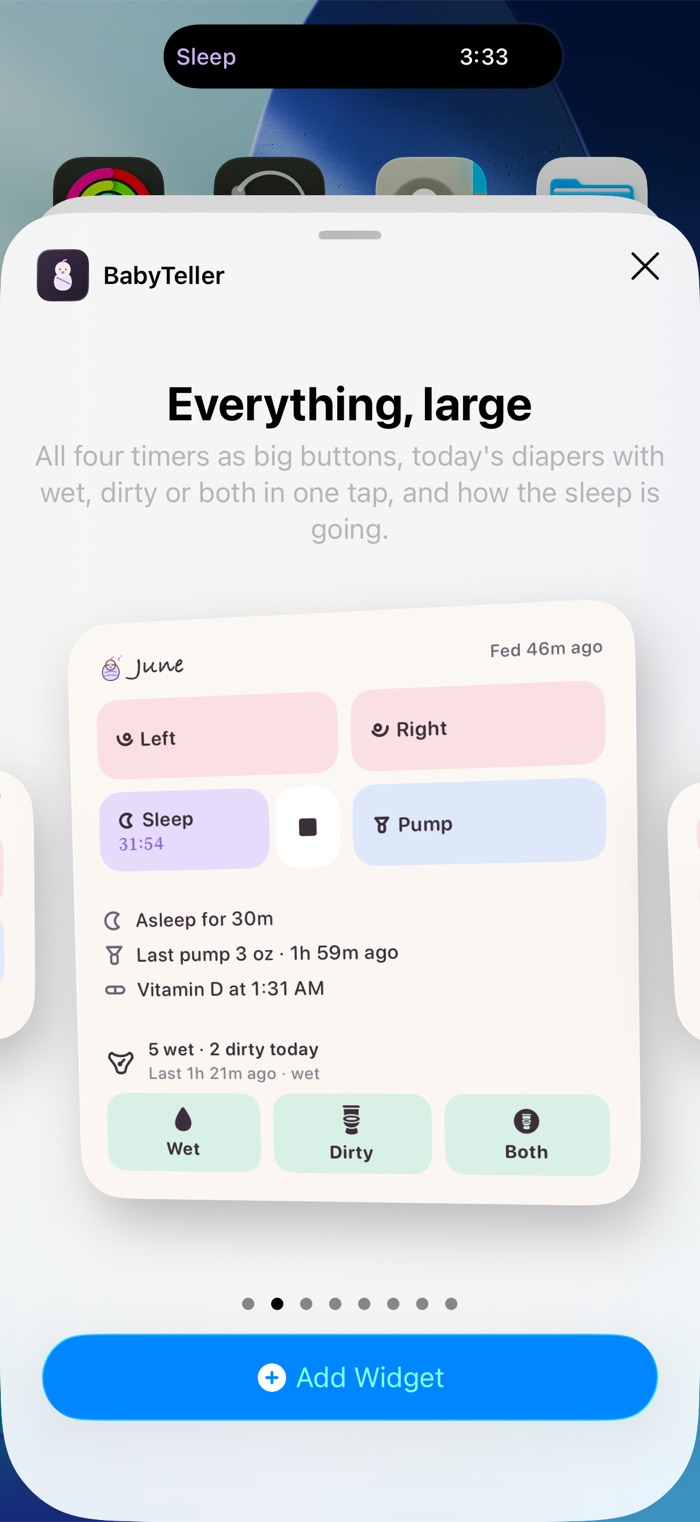
Real buttons on the home screen: Left, Right, Sleep, Pump, Wet, Dirty, Both. They log where you stand. They don't open the app first.

1

From Control Center

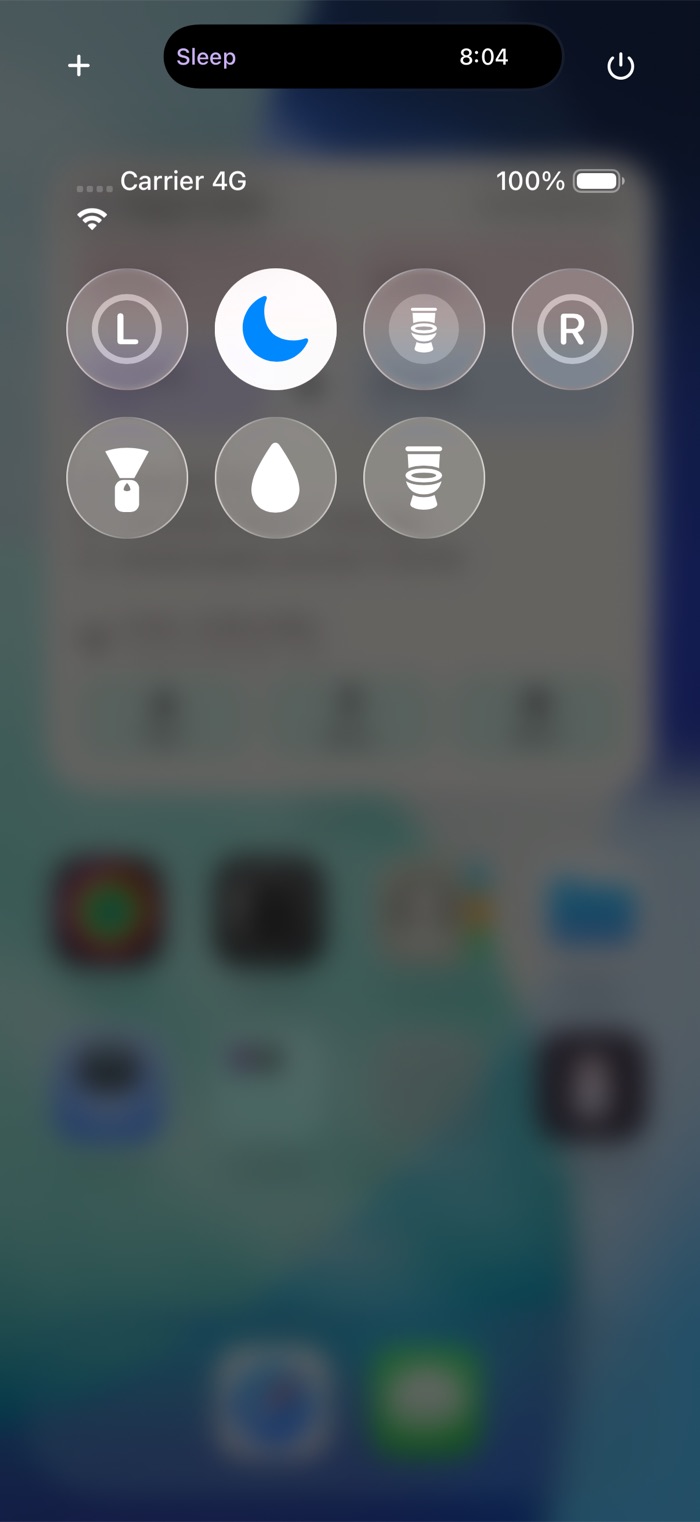
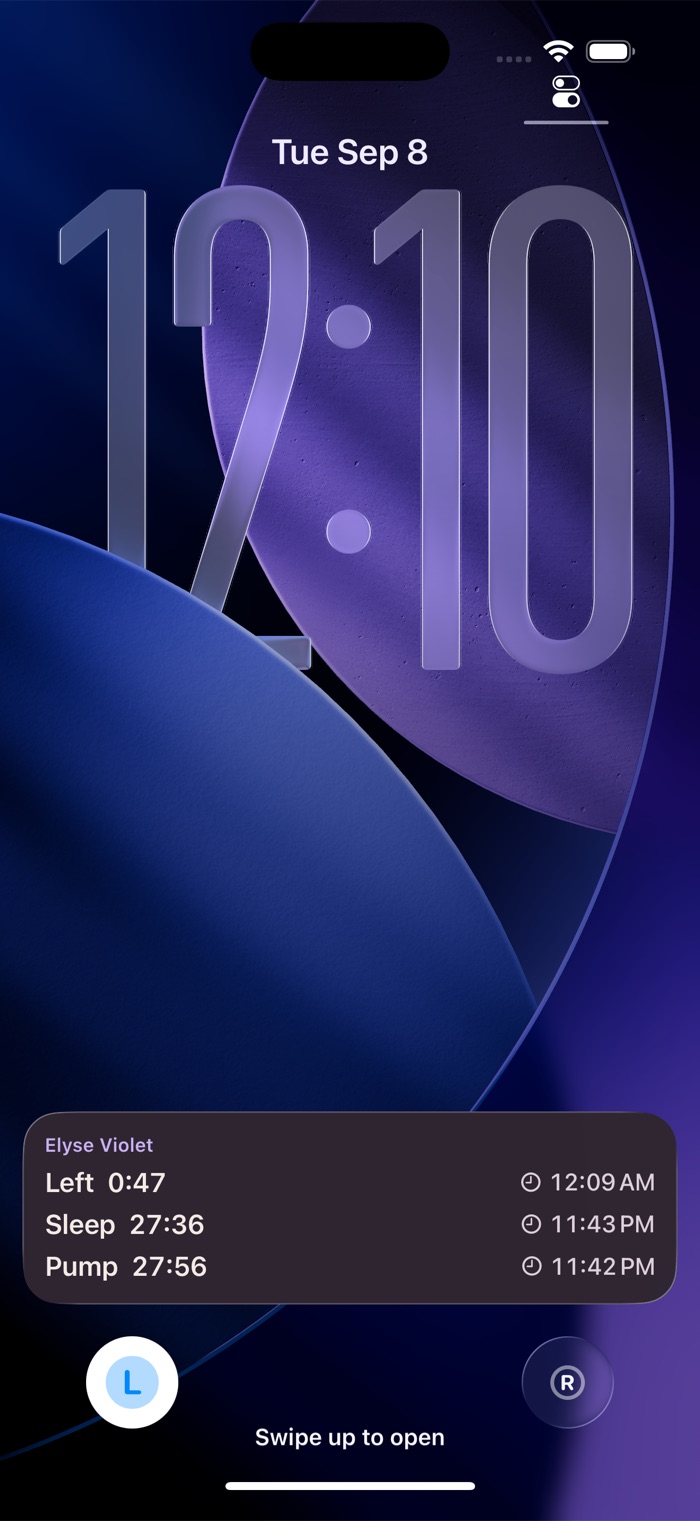
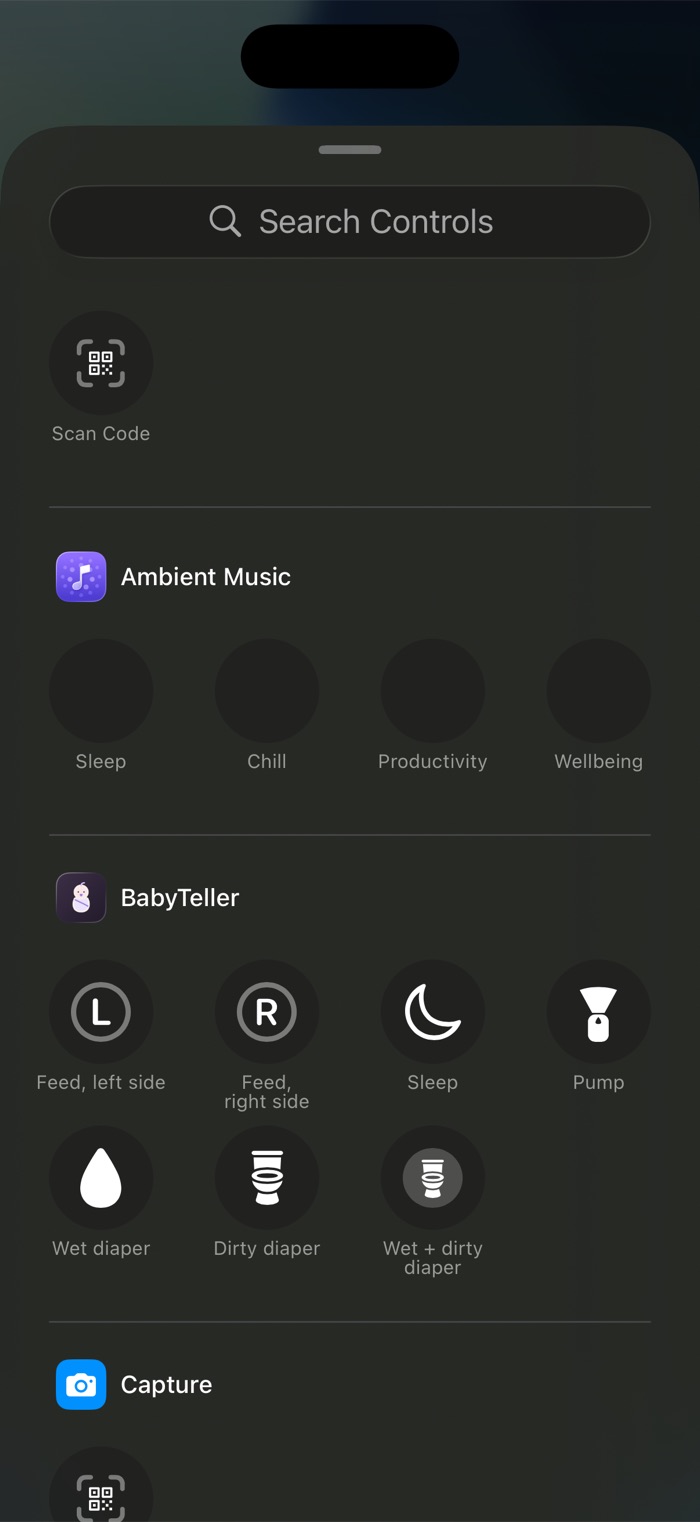
Swipe down, tap. Seven controls, so the one you need is already there. Put two on the Lock Screen and it is zero swipes.

0

By just saying it

"Hey Siri, BabyTeller wet diaper." Nothing to unlock, nothing to find, and it answers in as few words as it can.

Private by default

In your iCloud, on both your phones

No account, no server, no company in the middle. Your log lives in exactly two places: your device, and your own iCloud through Apple's CloudKit. There is no corporation collecting your baby's first year, and no database of mine to breach, because I hold nothing and built nowhere to put it.

On both phones instantly. Madelyn logs a feed and it is on my phone before I have put the bottle down, and every entry says who logged it. It rides on Apple's own sharing, so it never leaves your iCloud on the way.

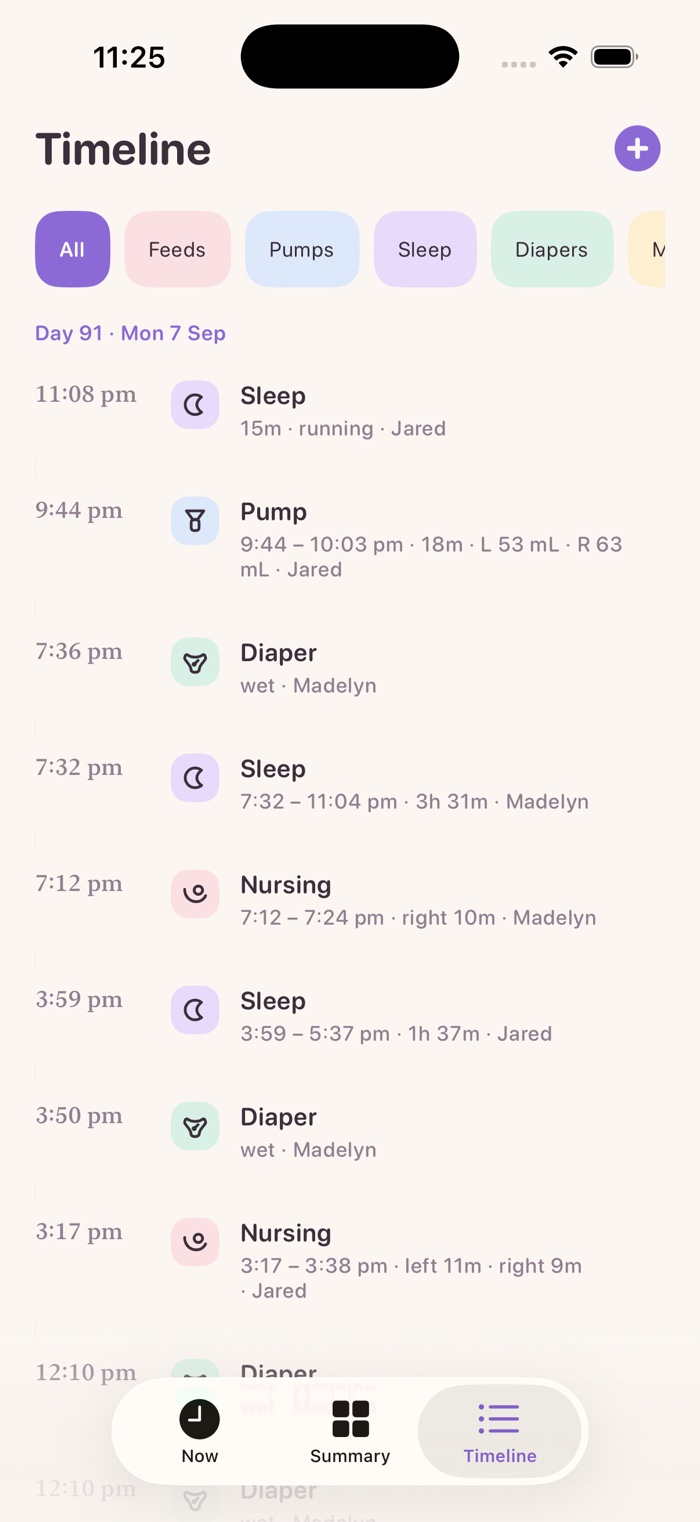
The timeline, showing each entry with its span and which parent logged it, Jared and Madelyn.

Your voice stays on the phone. The dictation page transcribes on your device and works the sentence out in the app itself, with no AI service in the loop. No recording is kept and nothing is sent anywhere.

No ads, no tracking, no third-party code. Not an analytics SDK, not an advertising one, nothing at all. Nobody is profiling your baby or selling what they did last night, because none of it ever reaches anyone.

Sharing with one other person is free, and it stays free. Most trackers put it behind a subscription, which is a strange thing to charge for when a baby usually has two parents. A third caregiver, a grandparent or a nanny, is part of the one-time unlock.

Integration

Everywhere iOS lets it be

Not a phone app with a widget bolted on. Built into the places iOS puts one tap away.

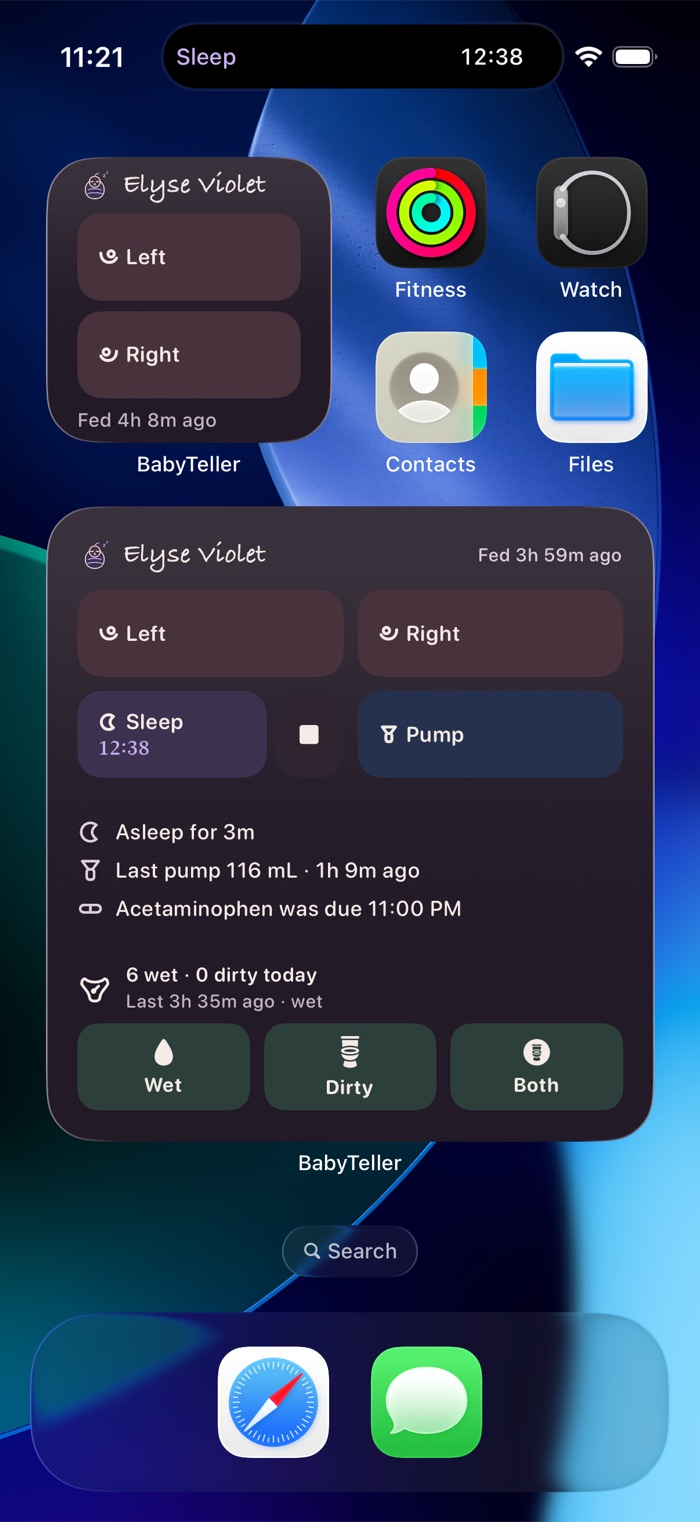
Two BabyTeller widgets on the home screen, small and large, showing live counts and running timers.
Widgets in every size, with buttons that log rather than launch.
Control Center with seven BabyTeller controls.
Seven Control Center controls. Sleep lights up while a nap is running.
The Lock Screen with Left and Right buttons in the bottom corners, the Left one lit, and three running timers listed above.
Left and Right on the Lock Screen. Tap one and the feed starts, without unlocking anything.
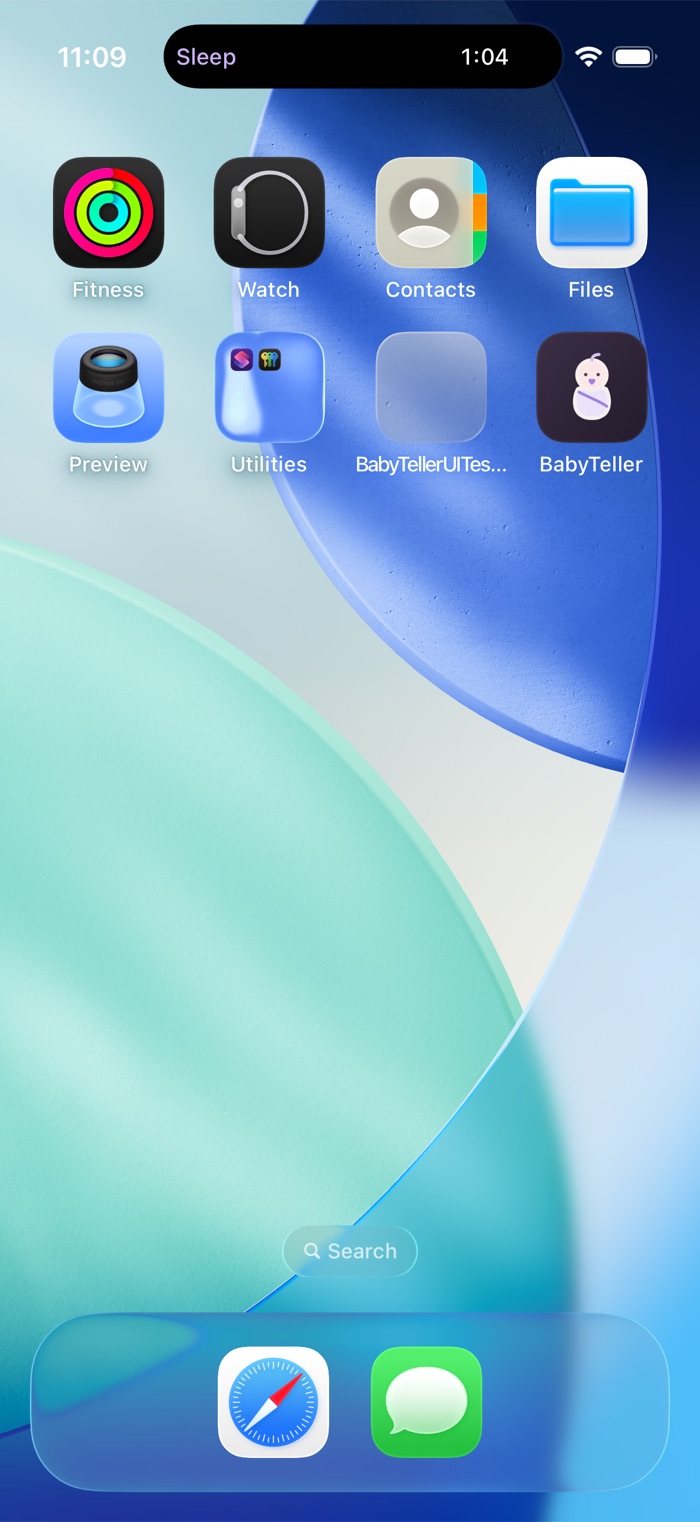
The Dynamic Island showing a running sleep timer.
And in the Dynamic Island, counting while you do something else.
The Control Center gallery listing BabyTeller's seven controls by name.
Every control, named plainly.
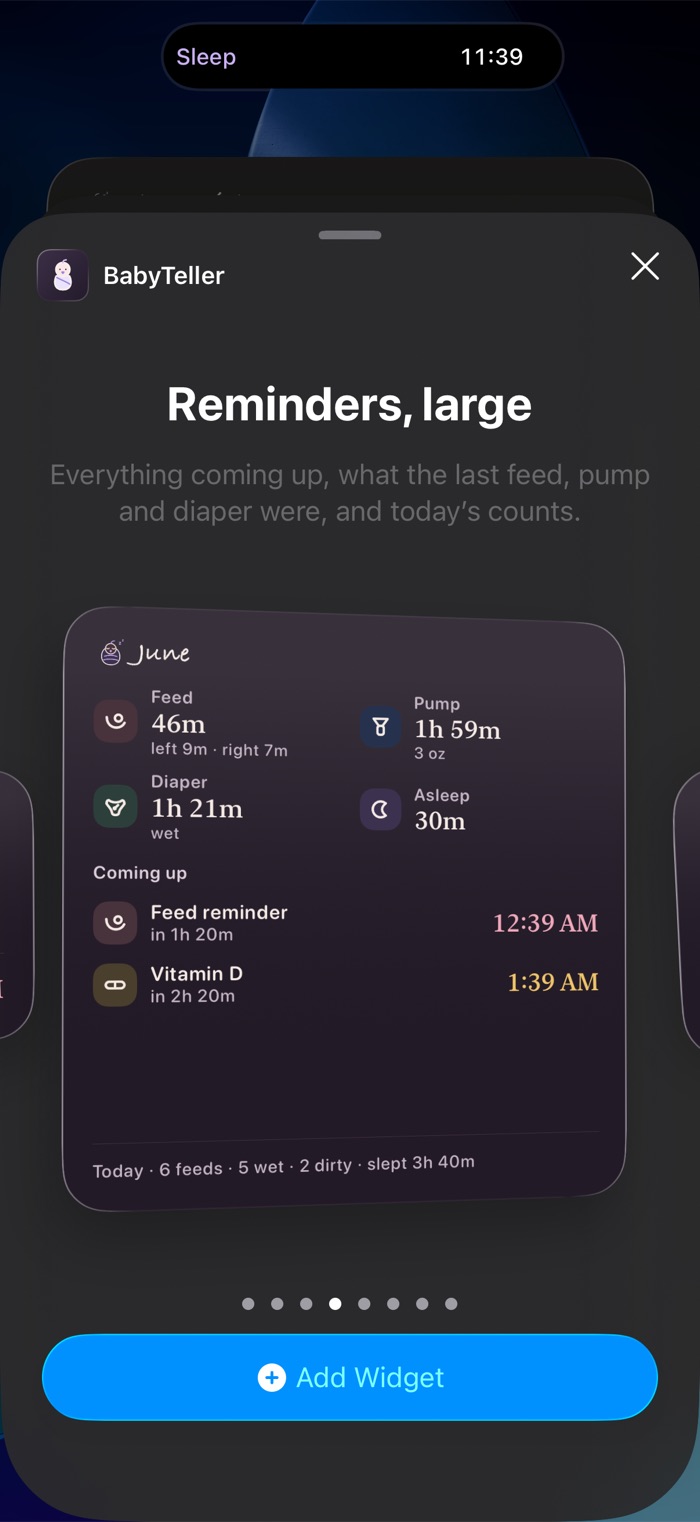
The widget gallery previewing the large Everything widget.
Eight widgets to choose from.
Hands free

Say it to Siri

No app to open, no screen to find, nothing to confirm. Say it and it is logged. All of it free.

  • Start the left side in BabyTeller
  • Stop the feed in BabyTeller
  • Log a wet diaper in BabyTeller
  • Start a nap in BabyTeller
  • Log a four ounce bottle in BabyTeller
  • When did she last eat in BabyTeller?

It knows the words people actually use at 3am: she's done, had a blowout, put her on the right. And it answers in as few words as it can. Left started. Nursing, left side, 40 minutes ago.

The dictation page

Put the phone down and keep talking

Press the button, set the phone on the table beside you and go back to the baby. It keeps listening and keeps logging as you go from the changing table to nursing to the pump. Siri takes one command at a time. This one does not stop until you do.

Premium, but you get a run of free sessions first, counted down on the page itself. This is the part you have to feel to believe, so I would rather you felt it.

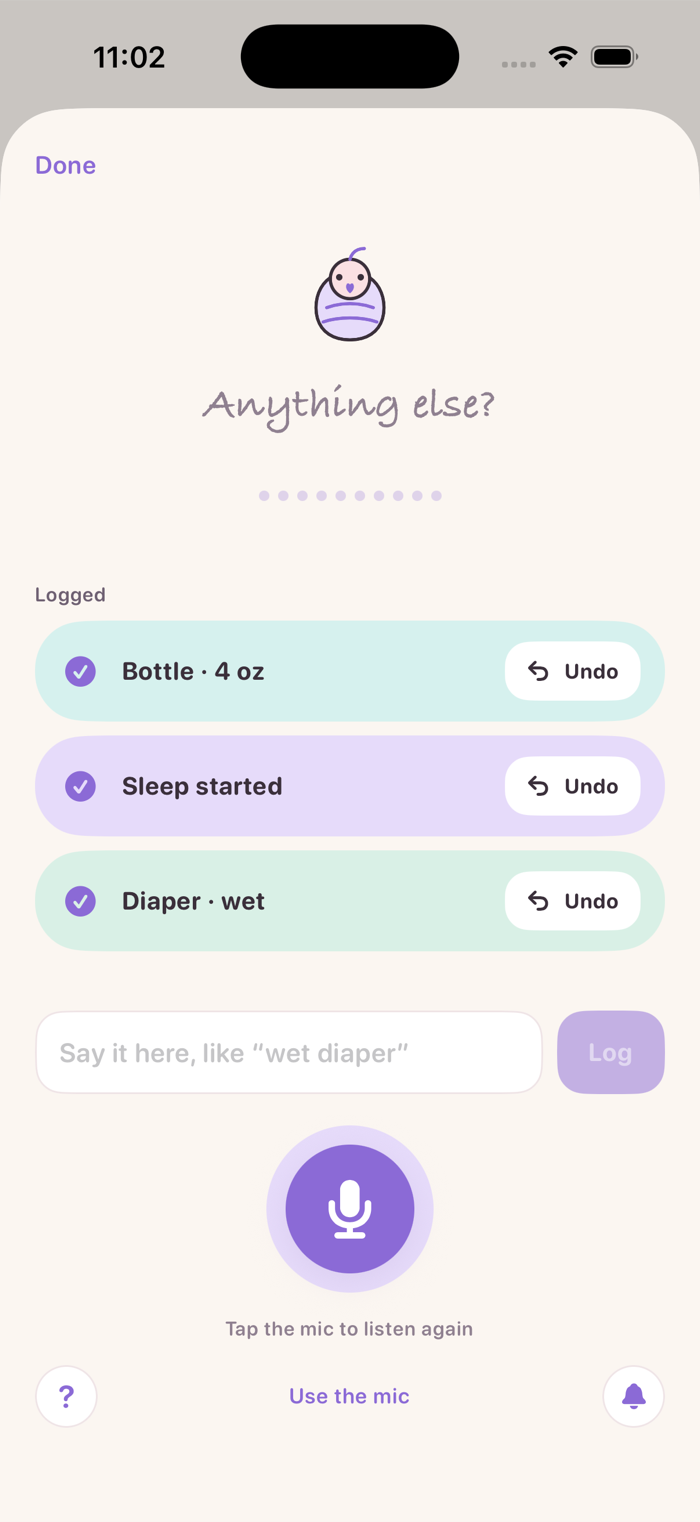
“Wet diaper, start sleep, and a four ounce bottle.”
Three commands parsed from one sentence, each logged on its own card with an Undo button.
Three things logged, each undoable on its own.
  • “She's on the left”the left side starts timing
  • “Asleep since two”a nap running, started at two
  • “Wet diaper at 3 and a dirty one at 5”two diapers, not one
  • “Dirty and wet, mucousy and brown”one diaper, with the color and texture on it
  • “Pumped 60 on the left and 45 on the right”a pump, both sides recorded
  • “Gave her tylenol, 2.5 ml”a dose, and the unit is remembered
  • “About four ounces”four ounces. A hedge is still a number
  • “I need a nap”nothing. That one is about you

It would rather ask than guess. Say this morning and it asks when, instead of writing the wrong time. Say something that could not have happened and it tells you why. The television in the room never ends up in your log.

Ask it a question and the answer comes with a button. When did she last eat? gets Nursing, left side, 40 minutes ago and a Start left.

It runs on your iPhone, and nowhere else. The speech model sits on the device, and the sentence is read by a parser built into the app rather than sent to an AI service. Nothing you say is uploaded, no recording is kept, and there is no model anywhere learning from your nights.

No signal needed. Once your language is on the phone, the whole thing works in airplane mode. What you log is saved on the spot and reaches your partner when the signal does.

What it gives back

Stats, not charts

It answers in sentences. How long since the last feed, how many diapers today, the longest stretch she has ever slept. Nothing to interpret and no axis to read at 3am.

No charts, and that is deliberate. A graph makes you work out what it means. A sentence just tells you.

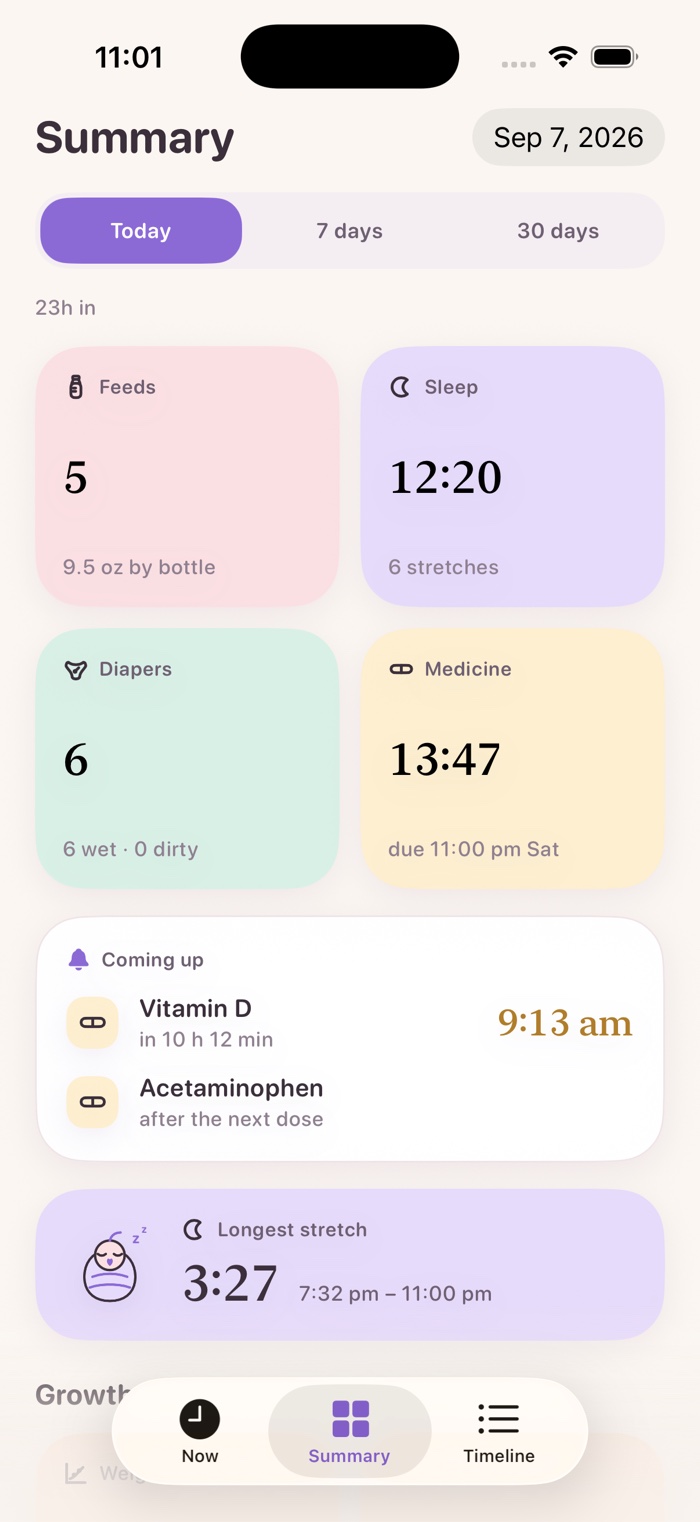
The Summary screen: feeds, sleep, diapers and medicine for today, what's coming up, and the longest sleep stretch.

The numbers a pediatrician asks for. Feeds, sleep, diapers and medicine, counted and totalled for today, in the words you would use to answer the question.

And what is coming up. The next dose and the next reminder sit on the same screen, so you never have to work out what is due.

Growth

Against the real curves

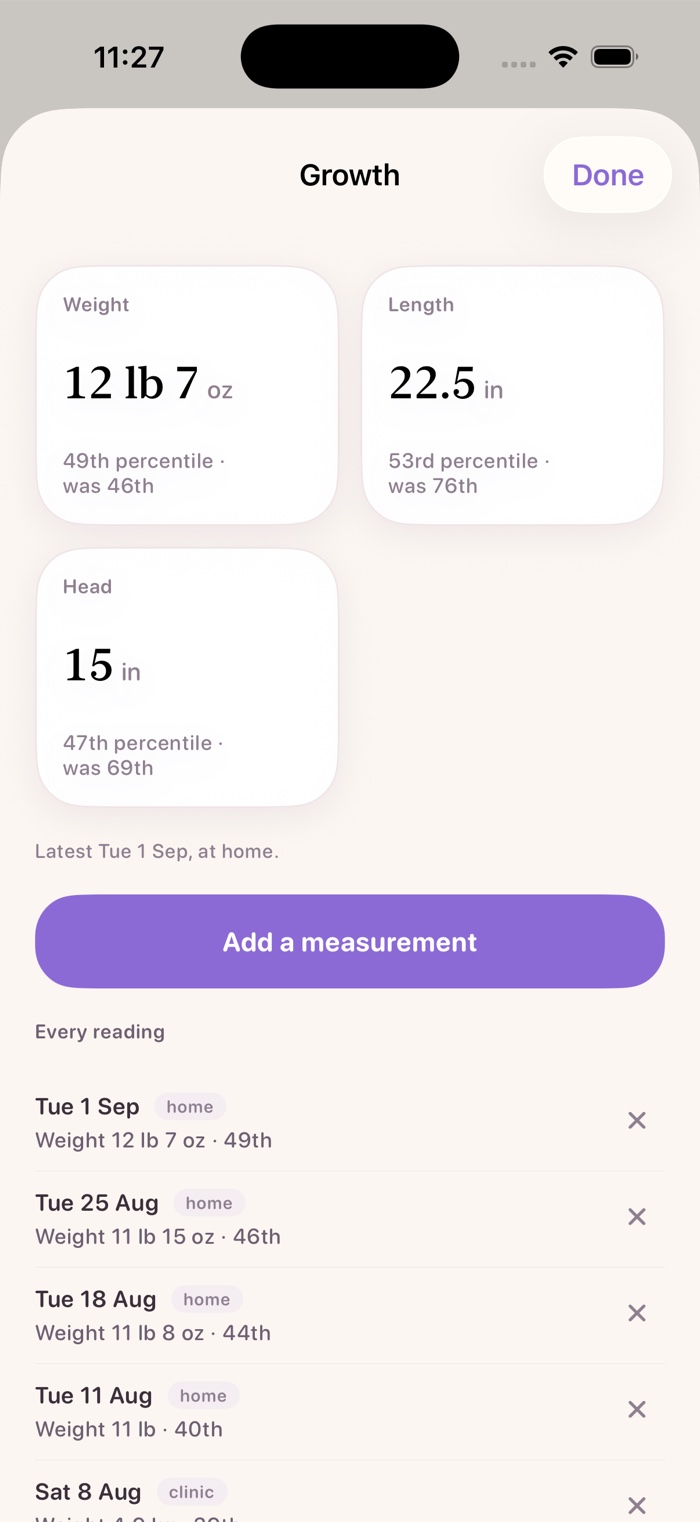
The three numbers a pediatrician reads. Weight, length and head size, each as a percentile with the previous one beside it so you can see which way it moved.

Corrected for the due date. If she came early, the percentile is worked from her corrected age rather than the calendar.

Growth percentile cards: weight 12 lb 7 oz at the 49th percentile, length 22.5 in at the 53rd, head 15 in at the 47th, each showing the previous percentile.

The real curves. The WHO Child Growth Standards, via CDC. The published coefficients ship inside the app, so the math runs on your phone and nothing is looked up.

It will not invent a number. If a percentile cannot be computed honestly it is not shown, because this is a number you might repeat to a doctor.

Night mode

Made for 3am

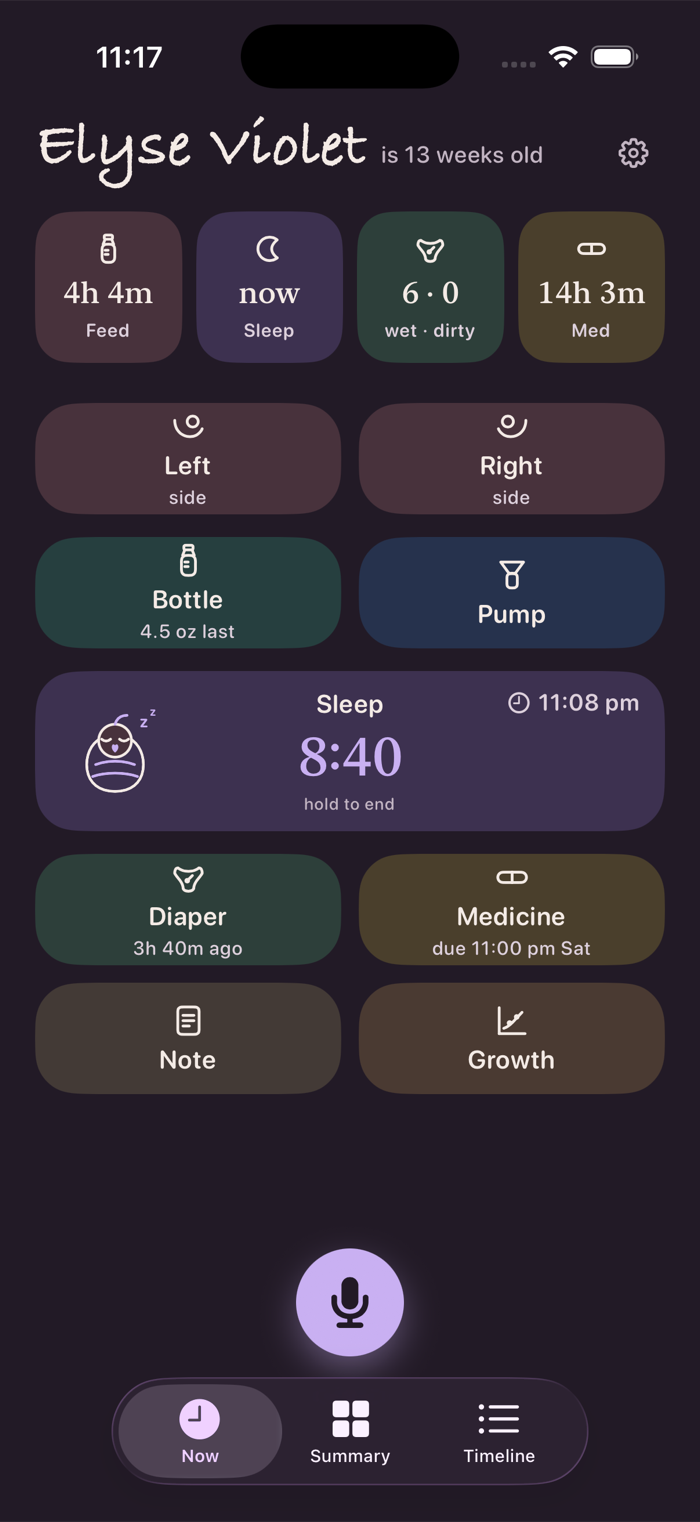
A nursery palette by day, the same colors dimmed on deep plum at night. Never pure white, because full contrast glares when you have just woken up.

The Now screen at night, in dimmed pastels on deep plum.
Now, at night.
The large Reminders widget at night.
The Reminders widget, dark.
Both widgets on a dark home screen.
Both widgets, dark.
Coming next

The next nap, in plain words

In development

When the log is dense enough, BabyTeller will say when the nap window opens, when bedtime is likely, and roughly when the next feed is due. Always a window, never a single minute, and it will always tell you what it is basing that on.

For power users

Shortcuts

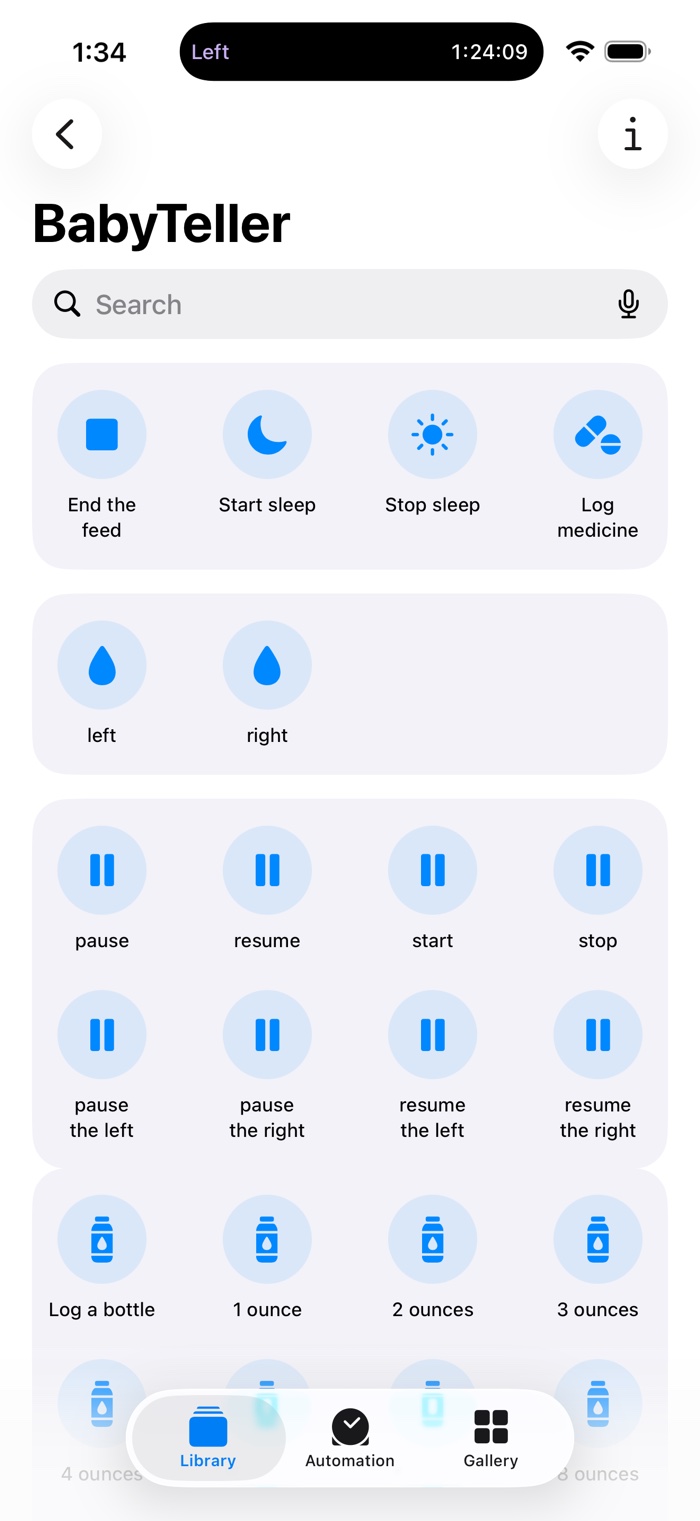
The Shortcuts app showing BabyTeller's actions: end the feed, start and stop sleep, log medicine, left and right, pause and resume each side.

Every action in the app is an App Intent, so Shortcuts can drive all of them, plus a few that live only there: pause and resume sleep, pause and resume the pump, and log a growth measurement.

Automate it. A Back Tap, a Home Screen icon, an NFC tag on the changing table, or an automation that fires when you connect to the nursery speaker.

Make it say your words. Rename any action and Siri matches your phrase instead of mine. A button in Settings opens Shortcuts straight to BabyTeller.

What you get

Almost all of it is free

Not a trial, not a teaser. The things you reach for at three in the morning have no price on them and never will.

Free, forever

No account, no ads, no subscription
  • Log nursing, bottles, pumping, diapers, sleep, medicine and notes
  • Siri, and every question it answers
  • Widgets in every size, with buttons that log
  • Control Center controls
  • Lock Screen controls
  • Live Activities and the Dynamic Island
  • The Summary, the timeline and every stat
  • Growth and WHO percentiles
  • Reminders and their notifications
  • Sharing the log with one other person
  • Export your data whenever you like
  • The night palette, and the app in your language's date and unit formats

Everything above stays free. It is not a list that shrinks later.

Pricing

Pay once, or don't pay at all

0subscriptions
0ads
0accounts

Everything you need at 3am is free, permanently: logging, the summary, Siri, widgets, Control Center, reminders, growth, and sharing with one other person.

Premium is $9.99 at launch, a one-time purchase, and buying at that price gets you everything added to it later.

One optional purchase unlocks the rest: more caregivers, more than one baby, and the app doing your thinking for you. You pay once and you own it. There is no subscription, and there never will be.

Not out yet

Want in early?

BabyTeller is being tested by real families in their real 3am, ours included. When it reaches the App Store, this is where it will be. Questions, or if you would like in early, write to [email protected].

iPhone, iOS 18 and later. watchOS and iPadOS coming soon.